

- HOME
- Payroll operations
- Guide to payroll software in the US: Features, benefits, and how it works
Guide to payroll software in the US: Features, benefits, and how it works
Payroll software is a tool that calculates what each employee earns, withholds the right federal, state, and local taxes, pays your team, and helps you deposit and report those taxes to the government. For a US small business, it replaces the IRS tables, deadline calendar, and multiple spreadsheets with one system that does the math every payday.
If you’ve just hired your first employee, a lot of new acronyms (EIN, FICA, FUTA) are probably landing at once. Most of them become routine once a payroll system handles the arithmetic for you. This guide explains what payroll software does, walks through a real US paycheck line by line, covers the main types, and helps you decide whether you need it yet.
What is payroll software?
Payroll software helps businesses manage the entire process of paying employees. It brings together employee information, pay rates, hours worked, benefits, taxes, and deductions to calculate how much each employee should be paid. It also manages salary payments, payroll records, tax deposits, and filings, depending on the level of service.
In the US, this involves more than calculating a take-home amount. Payroll must account for several federal, state, and local taxes, each with its own rules, rates, and limits. Some are paid by employees, some by employers, and others are shared. How much of that the software does for you depends on the type you choose, which this guide covers below.
How does payroll software work?
Payroll software runs in a loop that repeats every pay period. It takes in pay data, calculates gross-to-net pay (from total earnings down to take-home pay), pays employees, and then records, deposits, and reports the taxes.
Here’s what it handles at each stage, from the day you hire someone to the entry in your books.
1. Employee onboarding
Payroll starts before the first paycheck. When you hire someone, the software collects and stores what it needs to pay them correctly:
Form W-4, which tells you how much federal income tax to withhold, plus the state withholding form if their state has an income tax
Pay details: hourly or salaried, the pay rate, the pay schedule, and the work location (which decides the state and local taxes)
Direct deposit details for their bank account
Benefit elections, such as 401(k) contributions or health insurance
Many payroll software products let new hires enter this information themselves through an employee portal, so you aren’t retyping it from paper forms.
Onboarding also triggers a reporting duty that’s easy to miss. Federal law requires you to report every new or rehired employee to the state where they work within 20 days of hiring them, and some states set a shorter deadline. Payroll software can track this deadline for you or file the report.
2. Pay calculation: Hourly and salaried
This is where gross pay (total earnings before anything is taken out) gets calculated. The method depends on how each person is paid.
Hourly employees are paid hours worked times their rate. Nonexempt employees (those covered by federal overtime rules) must get at least 1.5 times their regular rate for every hour over 40 in a workweek. If Sam earns $22 an hour and works 44 hours in a week, his gross pay is $880 for the first 40 hours plus $132 for 4 overtime hours at $33, which comes to $1,012.
Salaried employees are paid their annual salary divided by the number of pay periods. The same $52,000 salary turns into a different paycheck on each schedule:
Pay schedule | Paychecks per year | Gross pay per paycheck |
Weekly | 52 | $1,000.00 |
Biweekly | 26 | $2,000.00 |
Semi-monthly | 24 | $2,166.67 |
Monthly | 12 | $4,333.33 |
The calculation gets harder in the cases that come up every month: a new hire who starts mid-period, a raise that takes effect on a Wednesday, an employee who works two jobs at different rates, or a night shift that pays a differential. These are the cases where spreadsheet errors tend to creep in. Payroll software prorates and applies them automatically.
3. Earnings beyond base pay: bonuses, commissions, and allowances
Many paychecks include more than regular wages:
Bonuses and commissions count as supplemental wages. IRS Publication 15 gives employers specific options for withholding federal income tax on them.
Allowances, such as a monthly phone or remote-work stipend, are usually taxable wages.
Expense reimbursements, such as mileage or travel, are a different case. If you reimburse under an accountable plan (the employee shows the expense was for business, documents it, and returns anything extra), the payment isn’t wages and isn’t taxed. A flat allowance paid without documentation is treated as taxable wages.
The tax difference between a $100 stipend and a $100 documented reimbursement is real, and payroll software handles each as its own earnings type so the right taxes apply.
4. Deductions
Deductions are amounts taken out of gross pay. Each type has different tax treatment, and that treatment decides which taxes the deduction reduces. Payroll software has to track this for every deduction on every paycheck.
Deduction | Example | Lowers federal income tax wages? | Lowers Social Security and Medicare wages? |
Traditional 401(k) | 5% of pay to retirement | Yes | No |
Roth 401(k) | After-tax retirement savings | No | No |
Section 125 (cafeteria plan) benefits | Health insurance premiums, FSA contributions | Yes | Yes |
Post-tax voluntary deductions | Union dues, charitable giving | No | No |
Garnishments | Child support, tax levies, creditor orders | No (taken from after-tax pay) | No |
Garnishments need the most care. They arrive as legal orders, come with limits on how much of an employee’s pay you can withhold, and follow priority rules when an employee has more than one. Payroll software applies the order on every paycheck until it ends.
5. Benefits and time off
Benefits show up on two sides of payroll. The employee’s share comes out as a deduction, and the employer’s share is a cost to the business. Some employer contributions, such as a 401(k) match, aren’t treated as wages, so no income tax, Social Security, or Medicare tax is withheld on them. Payroll software records both sides so the employee’s pay stub, the employer’s costs, and the benefits provider’s records all agree.
Paid time off works the same way. The software tracks how much vacation or sick leave each employee has earned and used, pays out leave when it’s taken, and applies your policy for unused leave when someone leaves. Federal law doesn’t require paid leave, but a number of states and cities require paid sick leave or set rules on paying out unused vacation, so your policy may need to follow local law.
6. Taxes
Once gross pay, earnings, and deductions are set, the software calculates taxes. A US paycheck usually involves at least five separate taxes, and the employer pays some of them on top of wages.
Tax | Who pays | 2026 rate | Reported on |
Federal income tax | Employee (you withhold it) | Based on the employee’s Form W-4 and IRS Publication 15-T tables | Form 941, Form W-2 |
Social Security | Employee and employer | 6.2% each, on wages up to $184,500 | Form 941, Form W-2 |
Medicare | Employee and employer | 1.45% each, with no wage cap | Form 941, Form W-2 |
Federal unemployment (FUTA) | Employer only | 6.0% on the first $7,000 per employee, or 0.6% after the full 5.4% state credit | Form 940 |
State income tax | Employee (you withhold it) | Set by each state. Texas and Florida, among others, have none | State withholding returns |
| State unemployment (SUTA) | Employer, in most states | A rate your state assigns to your business | State unemployment returns |
Some cities and counties add local income taxes on top of these.
7. Payments, pay stubs, and filings
With net pay calculated, the software pays employees by direct deposit or check and produces a pay stub showing every line that went into the paycheck. It then adds the withheld taxes and your employer share to your tax liability and deposits them on the schedule the IRS assigns you.
That schedule depends on your lookback period (a 12-month period the IRS uses to set it). If you reported $50,000 or less in employment taxes during the lookback period, you’re a monthly depositor. If you reported more, you’re a semiweekly depositor. New employers start as monthly depositors because their lookback total counts as zero.
The software also prepares the returns that summarize every paycheck:
Form | What it reports | Due |
Form 941 | Federal income tax, social security, and medicare for the quarter | Last day of the month after the quarter ends: April 30, July 31, October 31, and January 31 |
Form 940 | Federal unemployment tax (FUTA) for the year | January 31 |
Form W-2 | Each employee's wages and taxes for the year | January 31, to employees and the social security administration |
If a deadline falls on a weekend or legal holiday, it moves to the next business day. January 31, 2027 is a Sunday, so the year-end deadlines for 2026 wages fall on Monday, February 1, 2027.
8. Journal entries and reports
Every pay run is also an accounting event. The money that left your bank account is only part of what payroll costs, and part of what you’ve withheld is money you owe someone else until you pay it over. Payroll software records this as a journal entry, either for your bookkeeper or posted directly to your accounting software.
Here’s the journal entry for Dana’s paycheck from the worked example below (Texas state unemployment left out for simplicity):
Account | Debit | Credit |
Wage expense | $2,000.00 |
|
Payroll tax expense (employer Social Security, Medicare, and FUTA) | $165.00 |
|
Cash (Dana’s net pay) |
| $1,602.85 |
Federal income tax payable |
| $144.15 |
Social Security and Medicare payable (both shares) |
| $306.00 |
401(k) contributions payable |
| $100.00 |
FUTA payable |
| $12.00 |
Total | $2,165.00 | $2,165.00 |
The “payable” lines are liabilities: money you’re holding until you deposit it with the IRS or send it to the 401(k) provider. When you make those payments, the liabilities clear. If payroll and your books don’t match, this is usually the first place an accountant looks.
Payroll software also produces reports from the same data, such as a payroll register (every paycheck in a pay run), tax liability summaries, and payroll cost by department or location. These are what you’ll use to budget for a new hire or answer an IRS notice.
Types of payroll software
You can sort payroll software three ways: where it runs, how much of the work it does, and what it connects to. Most products are a combination, such as a cloud-based, full-service, standalone tool.
Cloud-based or desktop
Cloud-based payroll software runs in a web browser or mobile app, and the vendor updates tax rates and forms on its end. Desktop software is installed on your own computer. It works offline, but you usually have to install the tax table updates yourself, and your data lives on one machine. Most small business payroll products today are cloud-based.
Related read: Cloud vs desktop payroll software: which one wins in 2026?
Self-service or full-service
Self-service payroll software calculates paychecks and produces reports, and then you make the tax deposits and file the returns yourself. Full-service software also moves the tax money and files federal, state, and local returns for you. The price difference is often small compared with the time it takes to deposit and file by hand.
Standalone, part of an HR suite, or attached to accounting software
Standalone payroll software focuses on paying people and handling payroll taxes. An HR suite (sometimes called an HRIS or HCM system) bundles payroll with hiring, onboarding, and performance management. Some accounting products offer payroll as an add-on. The right fit depends on which system you already use every day.
Type | What it does | Suits | Check before you buy |
Cloud-based | Runs online, with tax updates applied by the vendor | Most small businesses | Security features and uptime |
Desktop | Installed locally | Businesses that need offline access | How tax table updates are delivered |
Self-service | Calculates pay. You deposit and file | Owners comfortable with IRS deadlines | Whether it produces Forms 941 and W-2 |
Full-service | Calculates, deposits, and files | Owners who want filing handled | Which state and local taxes it files |
Standalone | Payroll and payroll tax only | Teams with separate HR tools | Integration with your accounting software |
HR suite | Payroll plus HR functions | Teams that want one system | Paying for HR features you won’t use |
Payroll software vs. payroll services and PEOs
People often compare payroll software with two outsourced options. A payroll service provider runs payroll for you. A professional employer organization (PEO) goes further and becomes a co-employer for tax and benefits purposes.
The difference that matters most is liability. The IRS is clear that if you use payroll software or a payroll service, you remain responsible for depositing the taxes and filing the returns on time. That holds even if you’ve sent the money to the provider. If they fail to pay, the IRS assesses penalties and interest on your account. A certified PEO (CPEO) is the main arrangement where that liability can shift to the provider.
The practical step: enroll in the IRS’s Electronic Federal Tax Payment System (EFTPS) yourself, even if your software makes the deposits. The IRS recommends this so you can see every deposit made under your EIN.
Related read: Pitfalls to avoid when choosing payroll software for your small business in the US
How to setup payroll software in the US
Most of setting up payroll software is gathering information you already have and entering it once. The step you can’t rush is the bank account, because most providers verify it before they’ll move any money, and that takes a few business days. Start at least a week before your first payday.
Prerequisites for setting up payroll software
You give the software two sets of information:
Company details: your Employer Identification Number (EIN, the federal tax ID for your business), your state tax and unemployment account numbers, your pay schedule (weekly, biweekly, semimonthly, or monthly), and the bank account payroll is paid from.
Employee details: each person’s Form W-4 (the federal withholding form that sets how much income tax to hold back), pay rate, work location, deductions such as 401(k) contributions, and direct deposit information.
If you’re moving from another provider or from spreadsheets partway through the year, you’ll also need a third set: each employee’s year-to-date wages, taxes, and deductions. Zoho Payroll’s own setup checklist asks for these same items, plus your business’s legal structure and any DBA (doing business as) name.
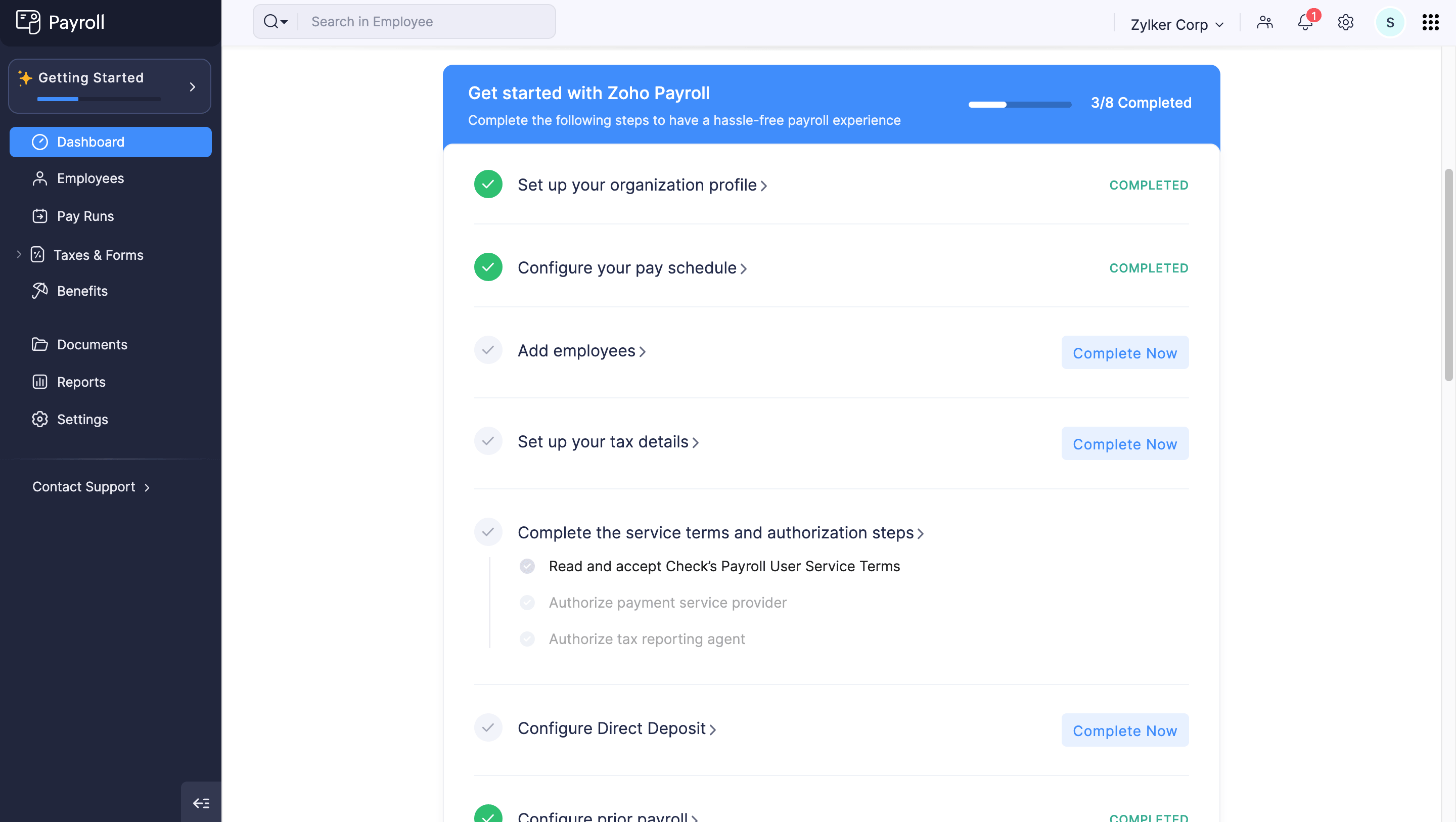
Choose your pay schedule
Pick how often you’ll pay and your first pay date. Some states set a minimum pay frequency, so check your state’s rules before you choose monthly. The Department of Labor keeps a state-by-state list.
Zoho Payroll supports weekly, biweekly, semimonthly, monthly, and quarterly pay schedules.
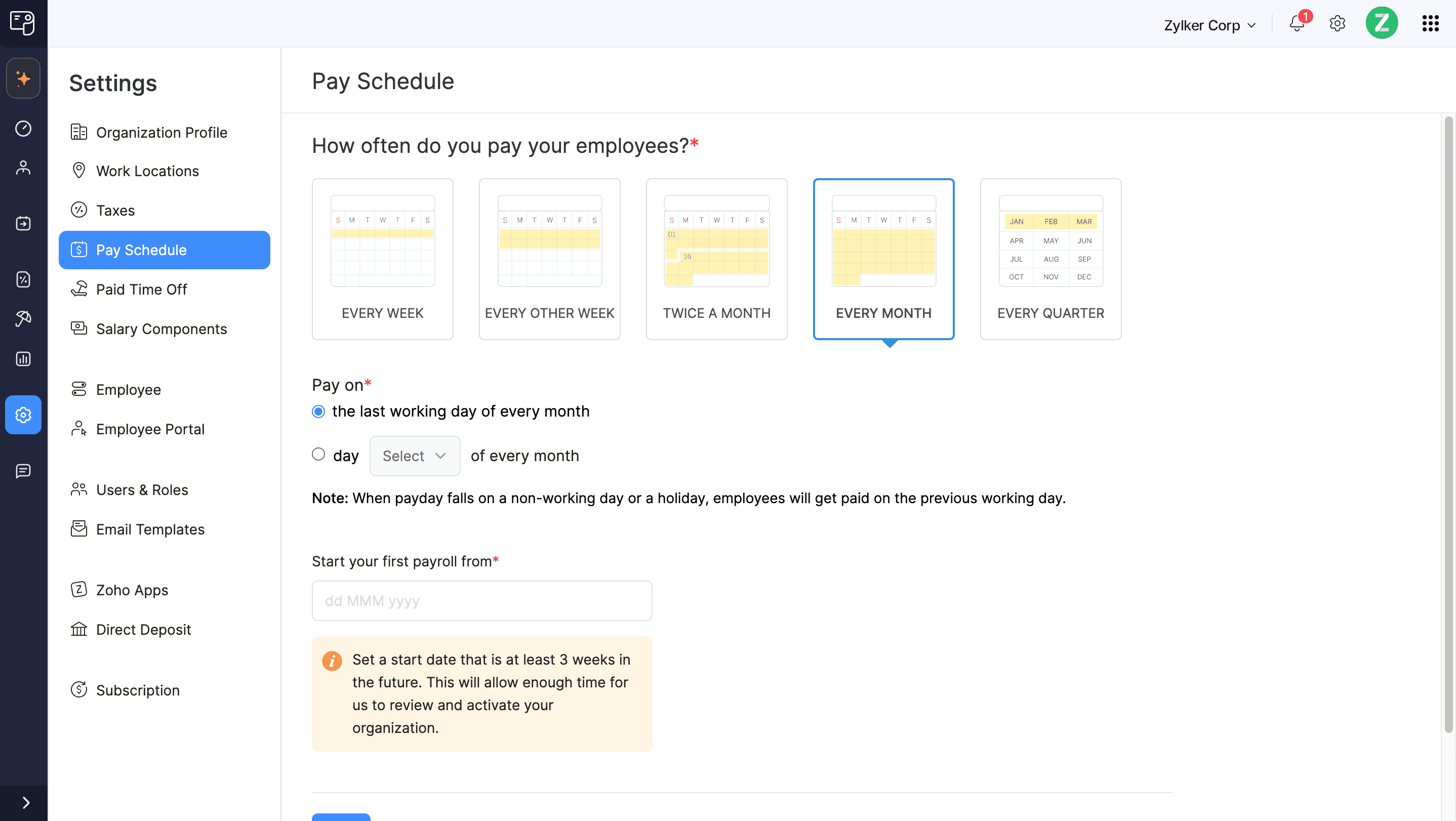
Add your employees
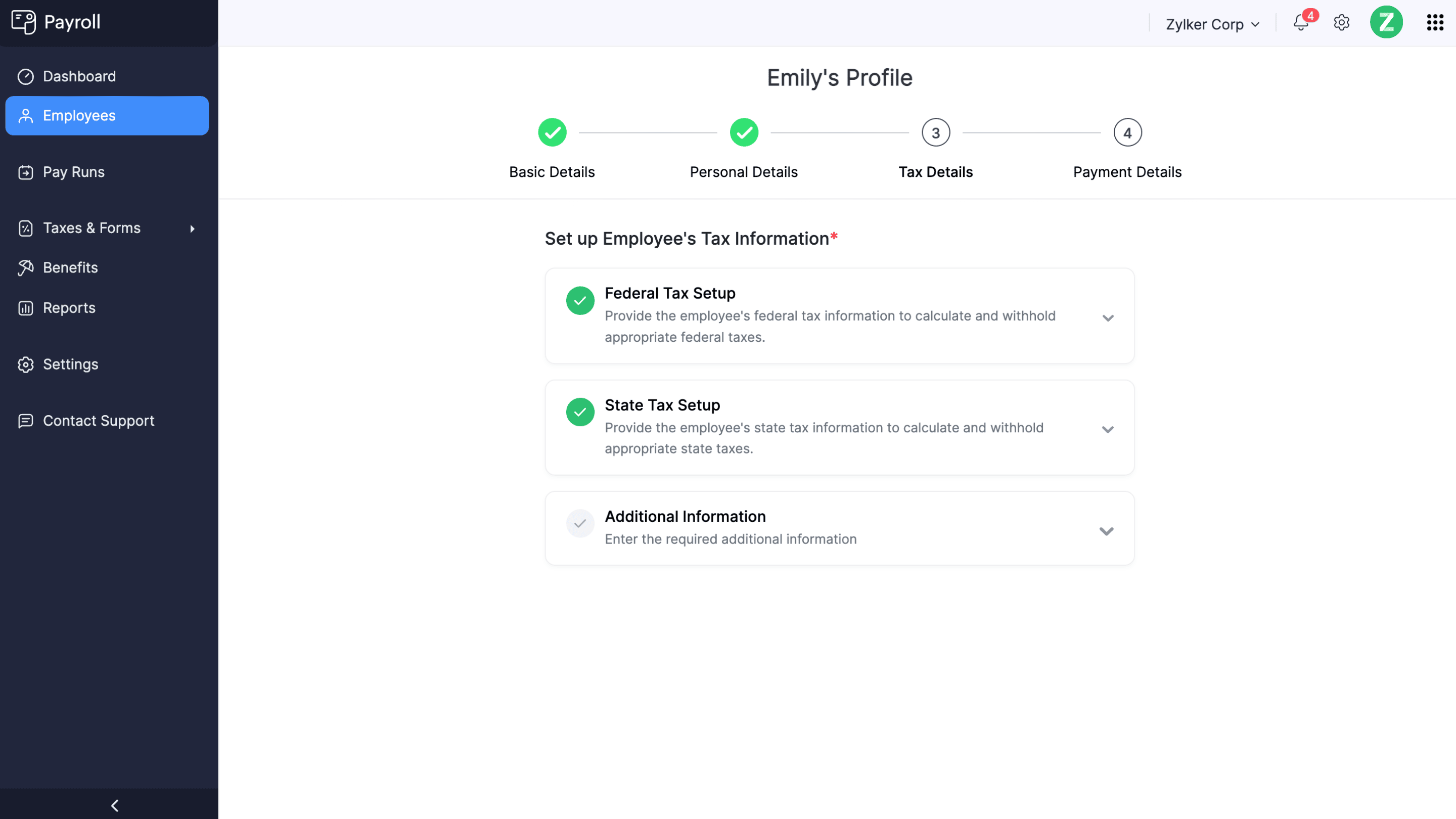
Enter each employee's details and invite them to their self-service portals. Zoho Payroll splits this onboarding process into four steps: Basic details, personal info, tax details, and payment details.
Bring in prior payroll if you're switching mid-year
If you’ve already paid employees this year, the new software needs those totals. Wage bases depend on year-to-date pay: Dana’s FUTA stops after her first $7,000, wherever she earned it. Her W-2 also has to cover the whole year, not only the months since you switched.
Zoho Payroll’s Prior Payroll module brings in your earlier pay runs so taxes, deductions, and year-to-date amounts carry over correctly.
Connect your bank account and authorize payments and filings
Add the bank account payroll will be paid from. Full-service payroll software then needs your written authorization to debit that account and to file tax returns on your behalf. The business owner or another person who can sign legal documents for the business usually has to complete this step. Remember that authorizing a provider doesn’t move your legal responsibility for the taxes, so keep your own EFTPS login and check the deposits.
Set up benefits, deductions, and time off
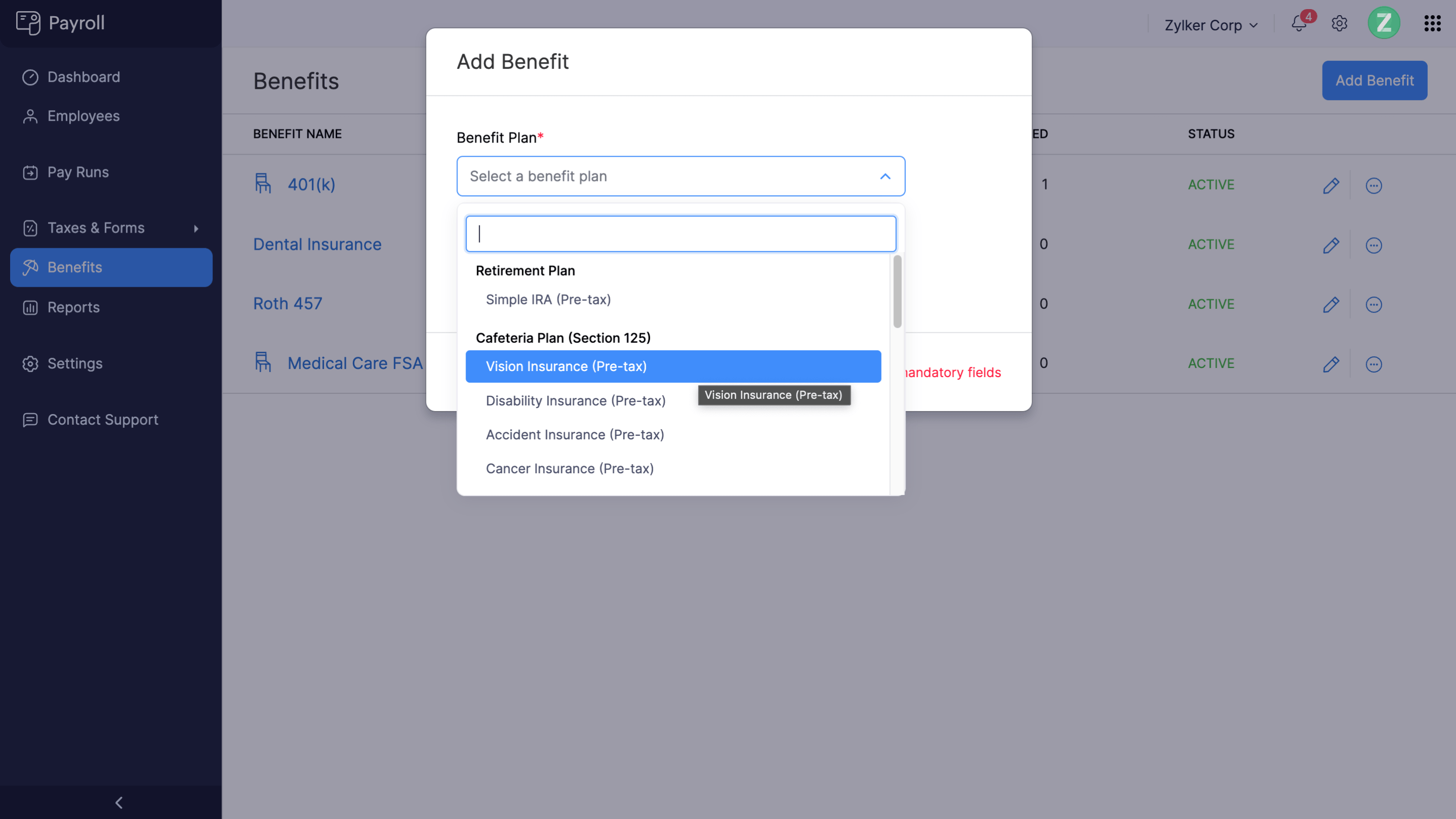
Add the benefits you offer, such as a 401(k) or health insurance, plus any garnishment orders and your paid time off policies. Then assign each one to the right employees. Check that each deduction’s tax treatment matches the deductions table above before your first pay run.
In Zoho Payroll, you assign benefits, deductions, and sick and vacation leave policies from each employee’s profile once they’ve been added.
Run your first payroll and check it
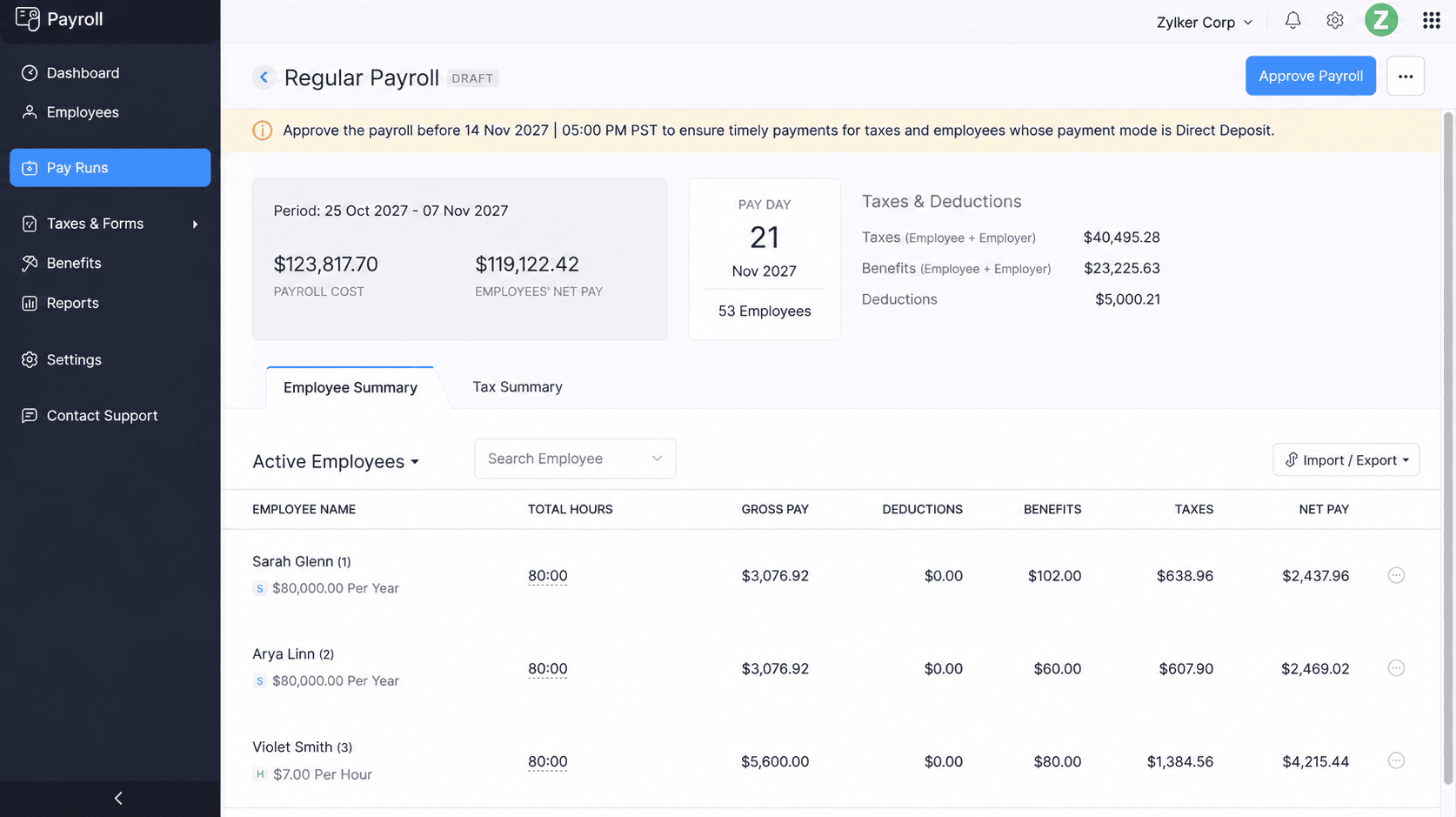
Before you approve the first pay run, check one paycheck line by line against a manual calculation, the way Dana’s example does. After payday, confirm that every employee was paid, look through a few pay stubs, and log in to EFTPS to see the federal deposit under your EIN.
Most of this setup happens once. After the first pay run, a regular payroll comes down to reviewing hours and changes, then approving.
Why do businesses use payroll software?
Businesses use payroll software to get the tax math right and pay on time without spending an afternoon on each pay run. The bigger benefit for most small businesses is avoiding penalties, because payroll tax rules change every year and the deadlines don’t move.
1. The rules change every year
The Social Security wage base rose from $176,100 in 2025 to $184,500 in 2026. The IRS reissues Publication 15-T every year with new withholding tables, and the 2026 edition added guidance on qualified tips and overtime under the One Big Beautiful Bill Act. Cloud payroll software applies these updates for you. If you run payroll by hand, you have to notice each change and apply it from the first paycheck of the year.
2. Late deposits get expensive fast
The IRS charges a failure-to-deposit penalty on any payroll tax deposit that’s late, short, or made the wrong way:
How late the deposit is | Penalty on the unpaid amount |
1 to 5 calendar days | 2% |
6 to 15 calendar days | 5% |
More than 15 calendar days | 10% |
More than 10 days after the first IRS notice | 15% |
For a 10-person team with a $9,000 monthly deposit, being four days late costs $180. Being 16 days late costs $900, plus interest. Missed quarterly returns bring their own separate penalty.
Full-service software removes most of this risk because it deposits on schedule. In Zoho Payroll, federal, state, and local taxes are calculated, paid, and filed automatically. Forms 940, 941, and 944 are generated from your pay run data, and you can track each filing’s status from the dashboard. You’re still the responsible party, so check that status after each deadline.
Related read: How payroll software protects you from IRS penalties
3. Records you’ll need later
The IRS requires you to keep employment tax records for at least four years. The Fair Labor Standards Act (FLSA) separately requires payroll records to be kept for at least three years. Payroll software stores every pay run, deposit, and filing in one place, which matters if an employee questions a paycheck or the IRS sends a notice.
4. Cleaner books
Every pay run creates accounting entries: wage expense, tax liabilities, and benefit liabilities. Payroll software that connects to your accounting system posts those entries for you, so your books match your payroll without anyone re-keying totals.
5. Fewer copies of sensitive data
Payroll runs on Social Security numbers and bank account details. Keeping them in a spreadsheet that gets emailed to a bookkeeper is a real exposure. Payroll software keeps them behind logins and permissions.
How payroll software helps employees
For employees, payroll software means accurate, on-time pay and a clear record of how each paycheck was calculated. It also lets them find their own pay information without asking you for it.
Pay stubs, every time: Payroll software creates one for every pay run, showing gross pay, each tax, each deduction, and year-to-date totals. Employees use pay stubs as proof of income for leases and loans, so being able to get one quickly makes a difference.
Self-service access: Most payroll software includes an employee portal or app where people can view pay stubs, update their W-4, change their direct deposit account, and download their W-2. Payroll admins get fewer “can you send me” emails.
W-2s on time: Employees need their W-2 to file their own tax returns, and it’s due to them by January 31. Software produces it from the year’s pay data, so the numbers match what they were actually paid.
Withholding that matches their W-4: If an employee claims a dependent or asks for extra withholding, the software applies it from the next paycheck. That means fewer surprises when they file their taxes.
- Benefits deducted correctly: Dana’s 401(k) example shows how much depends on getting deduction rules right. When the software handles them, employees’ retirement contributions and insurance premiums come out at the right amount and with the right tax treatment.
What features to look for in payroll software
Start with the features that keep you compliant, then add the ones that fit how your team works. Use this table as a checklist when you compare products.
Feature | Why it matters |
Automatic tax calculation and updates | Rates and wage bases change every year |
Tax deposits and filings | This is where most penalties come from |
Year-end forms | W-2s and Form 940 are due January 31 |
Pay schedules and off-cycle runs | You’ll need a one-off check for a correction or a final paycheck |
Hourly pay and overtime | Overtime has its own federal rules |
Benefits and deductions | Each deduction has its own tax treatment |
Paid time off | PTO balances and payouts affect pay |
Employee self-service | Saves you routine requests |
Multi-state payroll | Remote hires bring new state taxes |
Accounting integration | Keeps your books matching payroll |
Approvals and user roles | Separates who prepares payroll from who approves it |
Reports | You’ll need payroll cost and tax totals for reporting |
Mid-year switching | Wage bases depend on year-to-date totals |
Support | Payroll problems are time-sensitive |
Check which plan includes each feature, because vendors often split them across tiers. In Zoho Payroll, for example, single-state payroll, automatic tax filing, off-cycle pay runs, benefits, the employee portal, and the Zoho Books integration (which posts payroll journal entries after each pay run) are all in the Standard plan. Multi-state payroll, bonus pay runs, multiple pay rates, and pay run approvals are in the Professional plan. If you have employees in more than one state, price the plan that includes multi-state payroll. The plan comparison page lists every feature by plan.
Is payroll software right for you?
If you're hiring your first employee, it's worth considering payroll software from the start. Even with a small team, running payroll in the US involves more than calculating salaries and sending paychecks. You need to account for federal and state tax withholdings, make timely tax deposits, file returns, and keep up with changing compliance requirements.
Here are a few reasons to put payroll software in place early:
You're hiring your first W-2 employee and want to get payroll and tax compliance right from the beginning.
You hire hourly employees who are eligible for overtime, making pay calculations more involved.
You start offering benefits such as 401(k) plans or health insurance that require payroll deductions.
You hire employees in another state and need to account for different tax and payroll requirements.
You want to stay on top of tax deposits and filing deadlines without tracking every date manually.
You'd rather spend payday managing your business than calculating withholdings and checking tax tables.
If you don't have employees and only work with independent contractors, you may not need payroll software yet. You'll generally report payments to eligible contractors using Form 1099-NEC rather than withhold payroll taxes or file Form 941. The same applies to a sole proprietor taking owner's draws, which aren't treated as employee wages.
Related read: Why payroll software still matters when you have one employee
Frequently asked questions on payroll software
How much does payroll software cost?
Most small business payroll software charges a monthly base fee plus a fee per employee, with lower rates for annual billing. Full-service plans and features like multi-state payroll usually cost more. Compare the total at your current headcount and at the headcount you expect in a year.
Can I run payroll in Excel?
Yes, if you build in this year’s IRS withholding tables, track each wage base, and make your deposits and filings yourself. The risk is in what changes: a new W-4, an employee crossing the FUTA or Social Security wage base, or new tables in January. A spreadsheet only catches those changes if you remember to update it.
Do I still need an accountant if I use payroll software?
Payroll software handles the recurring calculations and filings. Many small businesses still use an accountant for year-end tax planning, worker classification questions, and IRS notices. Most payroll software lets you give your accountant their own login.
Can I switch payroll software in the middle of the year?
Yes, you’ll need to import each employee’s year-to-date wages, taxes, and deductions so the new software knows where everyone stands against the Social Security and FUTA wage bases. Switching at the start of a quarter keeps your Form 941 filings cleaner.

This article is for general information and reflects rules in effect as of November 2026. Payroll tax rules change often and vary by state. Check with a tax professional for your specific situation.